
Canadian time tracking · CAD pricing · PIPEDA-hosted

Every hour, tracked, approved, and billed — without a spreadsheet.

MapleTime is a Canadian-hosted time tracking and timesheet platform. Start/stop timers and manual entries by project and task, billable vs non-billable projects, a weekly submit-and-approve workflow, overtime classification, and pay-period exports for payroll. Built for SMB employees, freelancers, and field teams. From $0 CAD/month.

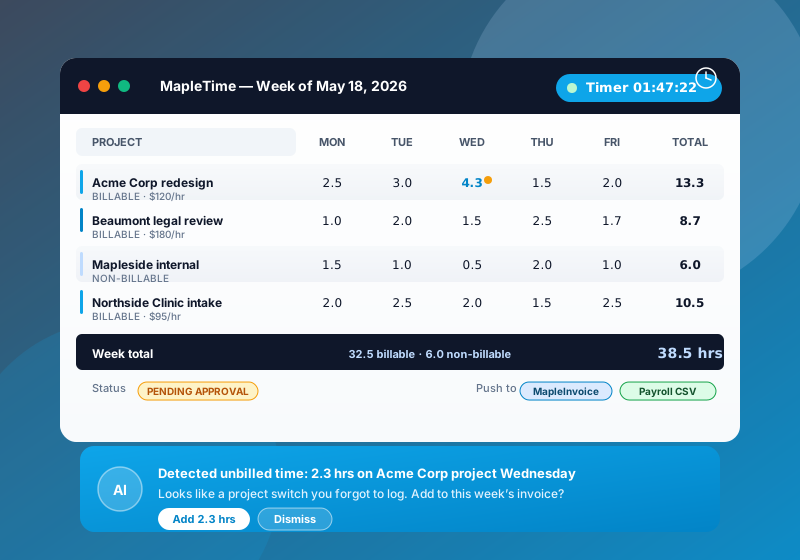
MapleTime weekly timesheet showing five days across four projects and a running timer
$0
Free solo plan
100% CA
Canadian data residency
CAD
All plans, no FX
What's inside

Everything you need to track, approve, and bill time

Timers, real approvals, overtime classification, and payroll exports. Canadian-hosted time tracking for SMB teams, priced in CAD.

Timer or manual entry

Start and stop a timer against a project and task, or add an entry after the fact. Every entry stays editable until the week is submitted.

Billable vs non-billable

Mark each project billable or non-billable, so client hours and internal hours are totalled separately every week.

Weekly approvals

Team members submit their week; a manager approves it. Approved weeks lock, so the hours payroll sees are the hours that were approved.

Payroll-ready exports

Approved hours are totalled per employee for each pay period and pay group, split into regular, overtime, and premium time. Each export carries a SHA-256 fingerprint so changes are detectable.

Clock in from your phone

A mobile web page for starting and stopping timers or adding entries on the go. Nothing to install; it runs in the phone browser.

Overtime + premium time

Classify minutes as regular, overtime, or premium (for example a shift premium), so pay-period totals arrive already split for payroll.

In the wild

See it in action

Time tracking that drops straight into invoices and Canadian payroll.

MapleTime timesheet on a laptop next to a wristwatch and open timesheet notebook in a Canadian small business setting
How we stack up

MapleTime vs. Toggl and Harvest

Canadian-hosted, CAD pricing, with approvals and payroll exports in the box.

Feature MapleTime Toggl Track Harvest
Canadian data residency
CAD-native pricing USD USD
PIPEDA aligned
Weekly approval workflow Add-on
Free plan Forever, solo 5 users 1 user / 2 projects
Starts at $0 CAD $10 USD / user $11 USD / user

Pricing pulled May 2026. Toggl and Harvest are trademarks of their respective owners.

Plans & pricing

Simple CAD pricing

All plans in Canadian dollars, no FX surprises, switch or cancel from the dashboard at any time.

Free

$0
CAD / user / mo
Solo time tracking, forever free.
  • Unlimited time entries
  • One user
  • Manual timer + browser app
  • Weekly + project totals
  • CSV export
Start free

Pro

$9
CAD / user / mo
For freelancers and sole proprietors.
  • Projects and tasks
  • Billable vs non-billable projects
  • Clock in from any phone browser
  • Weekly + project totals
  • Export your timesheets
Choose Pro

Business

$39
CAD / user / mo
For agencies and shift-based field teams.
  • Everything in Team
  • Pay-period exports by pay group
  • Tamper-evident (hashed) payroll exports
  • Priority support
Choose Business
Need a custom payroll export? Email [email protected].
Questions & answers

Frequently asked questions

Common questions about MapleTime. Have something else? Email [email protected].

What is MapleTime?
MapleTime is a Canadian-hosted time tracking and timesheet platform for SMB employees, freelancers, and field teams. Track time with a start/stop timer or manual entries by project and task, submit each week for manager approval, and export approved hours by pay period for payroll.
How is MapleTime different from Toggl, Harvest, or Clockify?
MapleTime is built for Canadian SMBs: prices are in CAD and data is hosted in Canada under PIPEDA. Weekly approval and pay-period payroll exports are included rather than sold as add-ons, and approved weeks lock so payroll works from the hours a manager signed off.
How do I track time in MapleTime?
Start and stop a timer against a project and task from the browser or the mobile web page, or add a manual entry after the fact. MapleTime does not record time automatically; every entry is one you started or added yourself.
How are billable hours handled?
Each project is marked billable or non-billable, so client hours and internal hours are totalled separately in your weekly and project views. Invoices are created in your invoicing tool; MapleTime does not create invoices for you today.
What does the weekly approval workflow look like?
Each team member submits their week, and a manager approves it. Approved timesheets lock against further edits, and only approved hours are included in payroll exports.
Can I export hours for payroll?
Yes. For each pay period and pay group, MapleTime totals approved hours per employee, split into regular, overtime, and premium time. Each export carries a SHA-256 fingerprint so any later change to the numbers is detectable.
What does MapleTime cost in CAD?
Solo time tracking is free forever. Pro is $9 CAD/user/month for freelancers, Team is $19 CAD/user/month (most popular for SMB teams with approvals and billable handoff), and Business is $39 CAD/user/month for agencies and shift-based field teams. All plans are billed in Canadian dollars, no FX surprises, and you can switch plans or cancel any time from the dashboard.
Is there a free plan for MapleTime?
Yes. MapleTime offers a free account so you can start with no credit card and no commitment. Create your free account, explore the core features, and upgrade to a paid plan only when you need more volume or advanced capabilities.
Is MapleTime Canadian-owned and hosted in Canada?
Yes. MapleTime is part of MapleWorkSuite, a Canadian product designed and owned in Canada (Joel & Nanz Inc., New Brunswick). Your data is hosted in Canada, billing is in CAD, and the platform is built with PIPEDA in mind — no surprise cross-border data on your business.

Ready to retire the timesheet spreadsheet?

Sign up in under 60 seconds. Solo time tracking is free forever — no credit card required.

Works best with

Companion Maple products

Some features in Mapletime need a companion Maple product to reach customers. Add them anytime from your dashboard.

MapleInvoice Recommended

Enables: Push billable hours to invoice

Learn more →