What is MapleDesk?
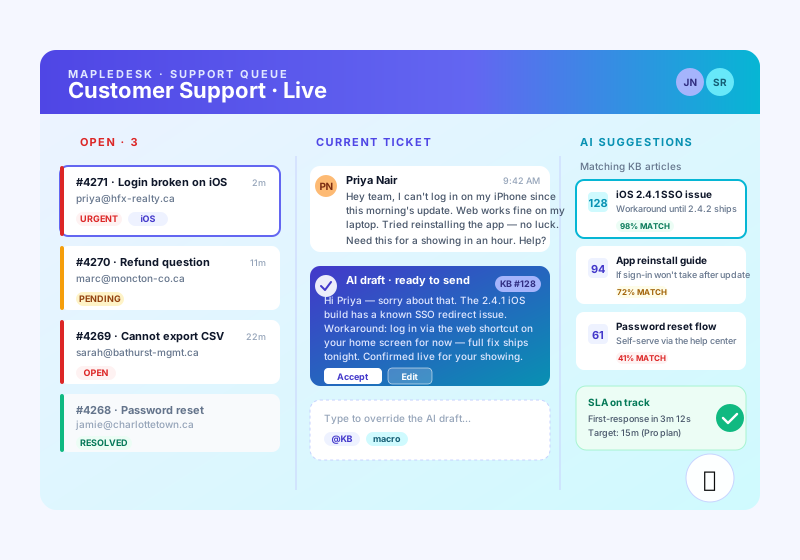
MapleDesk is a Canadian-hosted customer support helpdesk. Your customers email or use the web portal; tickets land in a shared inbox where your agents triage, reply, and resolve. An AI co-pilot drafts replies based on your knowledge base, so first-response time drops from hours to minutes.
How does MapleDesk compare to Zendesk, Freshdesk, and Intercom?
Zendesk, Freshdesk, and Intercom are excellent — and priced for US enterprise budgets in USD. MapleDesk is purpose-built for Canadian SMBs: pricing in CAD, data residency in Canada (PIPEDA-aligned), and tight integration with the MapleWorkSuite stack. The AI-drafted reply experience is comparable to Intercom Fin, but your KB and tickets never leave the country.
How do AI-drafted replies work?
When a ticket arrives, MapleDesk reads the message, searches your knowledge base, and generates a suggested reply your agent can accept, edit, or discard with one click. The model is grounded in your articles only — no hallucinated facts. Every accepted suggestion improves future drafts for that ticket category.
Is the knowledge base searchable for customers?
Yes. Your branded help center is public by default with semantic search across every article. When a customer submits a ticket, MapleDesk shows them matching KB articles in real time — most issues self-resolve before a ticket is created. Search uses vector embeddings, so "can I get a refund" finds the article titled "Return policy".
Does MapleDesk integrate with MapleMail and MapleConcierge?
Tightly. MapleMail forwards support-addressed inboxes (
[email protected]) straight into MapleDesk as tickets. MapleConcierge tenants who hit "request maintenance" file a MapleDesk ticket scoped to the right unit and property — your superintendent sees it in their queue with the address, lease, and prior history attached. Cross-product context, one login.
Are ticket emails CASL-compliant?
Yes — by design. CASL exempts transactional and customer-initiated correspondence, which is exactly what ticket replies are. MapleDesk preserves the message thread, includes physical-address and unsubscribe footers on any broadcast announcements, and logs the legal basis for every outbound message for your records.
How is pricing structured?
Per agent, per month, in CAD. Free plan covers a single agent with 50 tickets per month — perfect for solo operators. Paid plans scale from $29 to $149 CAD per agent. There are no per-ticket fees and no surcharges for the AI co-pilot on paid plans. Annual billing saves 17%.
Can I report on SLAs and agent performance?
Yes. Out of the box you get first-response time, resolution time, CSAT, and reopened-ticket rate, sliced by agent, channel, and tag. SLA policies trigger alerts before breach, not after, and the dashboard exports to CSV for board reporting.
Can I organize tickets by department or team?
Yes. Create departments such as Billing, Technical, or Sales, each with its own agents, support address, and routing rules. Incoming tickets are auto-assigned to the right department by the address they hit or by tag, so the billing team never wades through password resets. Agents only see the queues they belong to unless you grant cross-department visibility.
What are SLA policies and how do I set them up?
An SLA policy sets target times for first response and resolution, and you can scope them by department, priority, or customer tier. MapleDesk shows a live countdown on every ticket and fires an alert to the assigned agent and manager before the clock runs out — not after a breach. SLA policies and alerts are included on Pro and above.
What happens when I hit the 50-ticket limit on the Free plan?
The Free plan covers one agent and up to 50 tickets per month. When you reach the cap, existing tickets stay fully usable but new ticket creation pauses until the next monthly reset or until you upgrade. Upgrading to Pro removes the ticket cap entirely — paid plans have unlimited tickets, so you are never throttled mid-conversation.
How does per-agent billing work?
You pay per agent seat, per month, in CAD: Pro is $29, Business is $59, and Enterprise is $149 per agent. Add or remove seats as your team changes and billing prorates automatically. Annual billing saves 17% (for example, Pro is $290 per agent per year). There are no per-ticket fees and no AI surcharges on paid plans.
Is there really a free plan, and what does it include?
Yes — the Free plan is genuinely free, no credit card required. It includes one agent, up to 50 tickets per month, the email and web-portal channels, a public knowledge base, and basic analytics. It is built for solo operators and very small teams. When you outgrow it, upgrading keeps all your tickets, articles, and history intact.
Does MapleDesk integrate with Zapier?
Yes. MapleDesk connects to Zapier so you can trigger workflows on events like new ticket, status change, or resolution, and push data to thousands of other apps. Use it to post new tickets to Slack, create rows in a spreadsheet, or sync customers with your CRM — no custom code required.
Does MapleDesk connect to MapleContacts?
Yes. When a ticket arrives from a known contact, MapleDesk pulls that person's record from MapleContacts — name, company, and prior interactions — so your agent has context without switching tabs. New customers who email support are added to MapleContacts automatically, keeping one source of truth across the MapleWorkSuite stack.
How do I turn support emails into tickets?
Point your support address (for example
[email protected]) at MapleDesk, or let MapleMail forward it for you. Every inbound email becomes a ticket, every reply threads onto it, and customers simply email as they always have — they never need to learn a portal. Setup is a single forwarding rule or a one-click MapleMail connection.
Does MapleDesk support canned responses or saved replies?
Yes. Save your most common answers as reusable templates and insert them into any reply in one click, with placeholders for the customer's name and ticket details. Canned responses pair well with the AI co-pilot: the AI drafts the unique parts while saved replies handle the boilerplate, keeping your tone consistent across the team.
Is there a customer self-service portal?
Yes. Every account gets a branded customer portal where people can submit tickets, track status, reply, and search your knowledge base — all under your own logo and domain. Suggested KB articles appear as customers type, so many questions resolve before a ticket is ever filed.
Can customers and agents attach files to tickets?
Yes. Customers and agents can attach files — screenshots, PDFs, logs, photos — to any ticket from email, the web portal, or chat. Attachments stay on Canadian infrastructure with the rest of the ticket data and remain part of the conversation history for audit and reference.
Where is my data stored, and is MapleDesk PIPEDA-compliant?
Every ticket, knowledge-base article, attachment, and customer record is stored on Canadian infrastructure — your data never leaves the country. MapleDesk is PIPEDA-aligned by default with audit logging built in. Enterprise plans add a dedicated Canadian-region tenancy and audit-log export for organizations with stricter compliance requirements.
Can I run multiple brands from one MapleDesk account?
Yes, on Business and Enterprise plans. Multi-brand workspaces let you run separate help centers, support addresses, and branding for each company or product line from a single login, while your agents work one shared queue. It is ideal for agencies and operators supporting several businesses at once.
What channels can customers reach me on?
Email and web portal are available on every plan, including Free. Pro and above add live chat and SMS, so customers reach you however they prefer — and every channel lands in the same unified inbox where agents can assign, snooze, merge, and tag. The AI co-pilot drafts replies across all channels.
How do I get started with MapleDesk?
Sign up free at mapleworksuite.com — no credit card needed. Connect your support email (or let MapleMail forward it), add a few knowledge-base articles so the AI co-pilot has material to draft from, and invite your agents. Most teams are taking live tickets the same day. Upgrade to a paid plan whenever you need unlimited tickets, SLAs, or extra channels.
Is MapleDesk Canadian-owned and hosted in Canada?
Yes. MapleDesk is part of MapleWorkSuite, a Canadian product designed and owned in Canada (Joel & Nanz Inc., New Brunswick). Your data is hosted in Canada, billing is in CAD, and the platform is built with PIPEDA in mind — no surprise cross-border data on your business.